Games with no install: play instantly in your phone or computer browser
Browser games run straight from a link: no storage used, no updates to wait for. How no-install games work and how to add one to your phone's home screen.
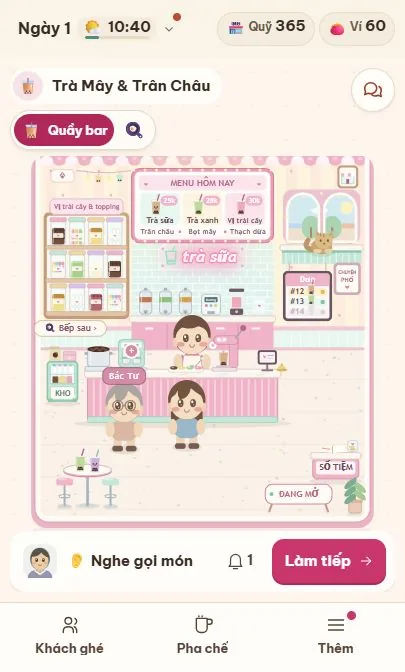
A no-install game, also called a browser game, runs straight from a web link: open it and play, with nothing to download or update. It is the lightest option when your phone is full or you only have a few minutes. Here is how browser games work, why they are handy and how to put one on your home screen.
What is a browser game?
A browser game, or web game, is a game that runs directly in Chrome, Safari, Edge, Firefox or any other modern browser, just like opening a website. Browser games used to be very simple. Today, browsers are powerful enough to run games with smooth animation, sound, saved progress and even playing alongside other people.
If you are curious about what goes on behind the scenes, our article on how web games are built explains the technology in plain language.
The benefits of games with no install
No storage used
The game does not sit on your device as a heavy app. The browser only loads what it needs, so you never have to delete photos to make room for a new game.
Always the latest version
Every time you open the game, you are playing the newest version. No "update required" message and no waiting for a download.
Works on any device
Phone, tablet, your work computer or the laptop at home: all you need is a browser and an internet connection. If the game has accounts, sign in and carry on exactly where you left off.
Easy to share
Want a friend to play with you? Send them the link in a message and you are done. They do not have to search an app store or wait for a download, and it does not matter whether they use Android, iPhone or a laptop.
How to add a browser game to your home screen
Many modern web games can be "installed" on your home screen as a PWA (Progressive Web App). Once added, the game gets its own icon and opens full screen like an app, while staying as light as a website. Phố Có Chuyện supports this.
Menu names can differ a little between browser versions, but the steps usually look like this.
On Android (Chrome)
- Open the game in Chrome.
- Tap the three-dot menu in the top right corner.
- Choose "Add to Home screen" or "Install app".
- Confirm, and the game icon appears on your home screen.
On iPhone (Safari)
- Open the game in Safari.
- Tap the Share button (the square with an arrow pointing up).
- Choose "Add to Home Screen".
- Rename it if you like, then tap "Add".
Browser games from TrioX Studios
TrioX Studios makes both iPhone apps and browser games. These two run right in your browser, are free to play and are available in English as well as Vietnamese:
- Phố Có Chuyện: a career simulation with more than 20 jobs, from a spicy noodle shop and a bubble tea shop to teaching and accounting. Free, with no real money in the game. Play at phocochuyen.io.vn.
- Nhà Có Mèo: a cat and dog care game with more than 100 breeds. Free, with no real-money top-ups, rewarded ads that are entirely optional, and no sign-in needed. Play at nhacomeo.io.vn.
Tips for smoother browser gaming
- Keep your browser up to date.
- Close tabs you are not using if your phone is on the slower side.
- Turn off battery saver mode if animations feel choppy, since it can slow the browser down.
- If you play without an account, do not clear the game's site data, because your progress may be stored there. Switching browsers can also leave your progress behind.
- To keep your progress long term and play on several devices, create an account in the game.
You can see every game we have made in our article on TrioX games.
Frequently asked questions
Do browser games need an internet connection?
Usually yes, at least to load the game and save progress online. If you often play on planes or in places with weak signal, look for games built to work offline. Our article on offline games that need no connection covers that side.
Where is my progress saved in a browser game?
It depends on the game. Many save progress in the browser on your device, and some also let you create an account to save on a server. In Nhà Có Mèo, for example, progress is saved in the browser right away, and an account lets you play across devices.
Are browser games safe to play?
Play on the game's official website, keep your browser updated and be cautious with any page that asks for payment details or personal information you would not normally share. A game should not need much more than a name to get started.
Is a browser game the same as an app?
Not quite. An app is downloaded from a store and installed, while a browser game loads from a website each time. A PWA sits in between: it opens like an app from your home screen but is still delivered through the browser.