Web game programming: Canvas, WebGL, Phaser and how to make games run smoothly
How to program browser games: HTML5 Canvas, WebGL, Phaser, PixiJS or Three.js, the game loop, asset loading, saving progress and mobile performance.
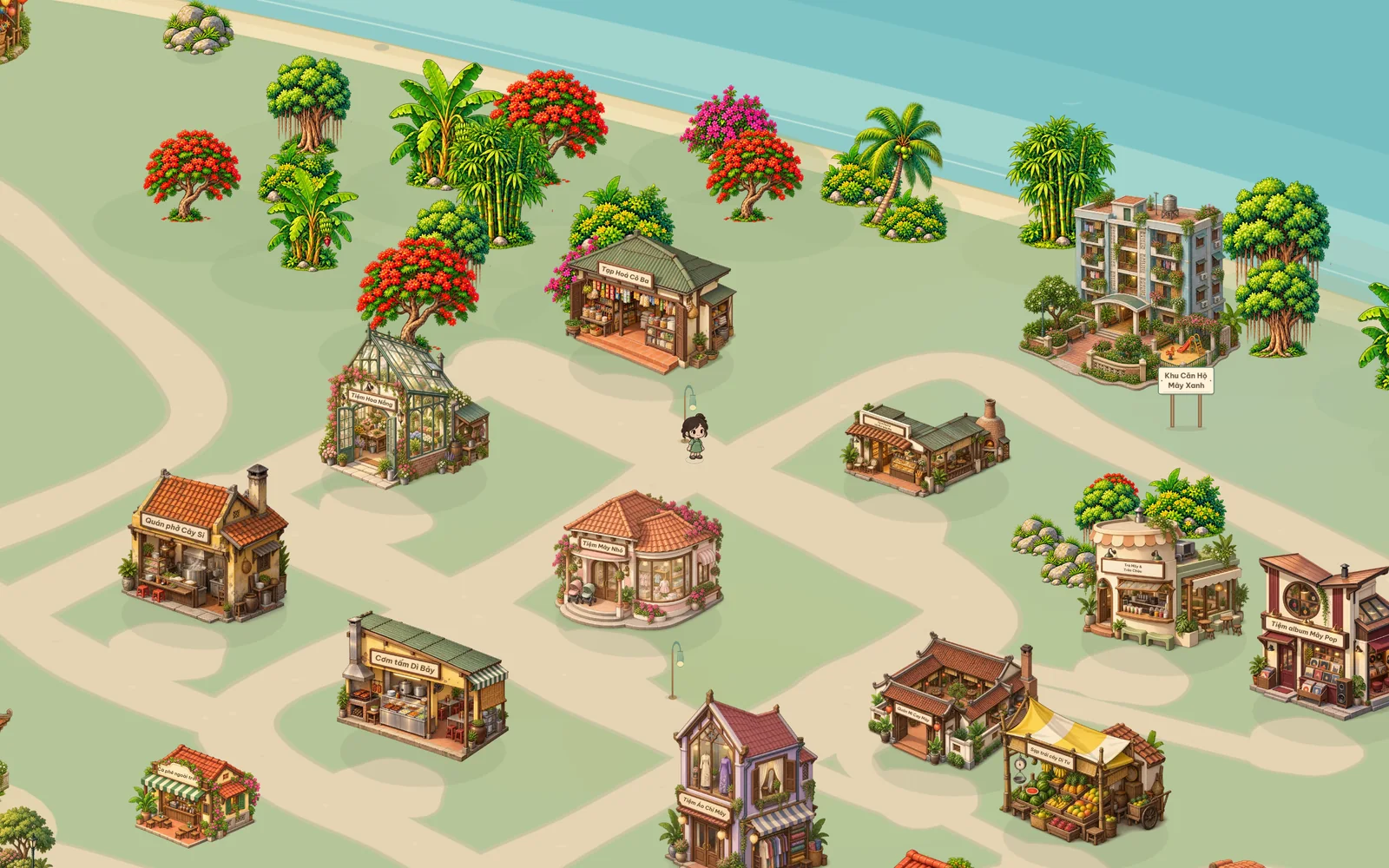
Web game programming means writing games that run directly in the browser with JavaScript or TypeScript, drawing through HTML5 Canvas or WebGL, usually with help from a library such as Phaser, PixiJS or Three.js. Players just open a link and play on a phone or a computer. This guide covers the main technical building blocks, with examples from Phố Có Chuyện, the job simulation game TrioX Studios built with Phaser.
Canvas, WebGL and WebGPU: what is the difference?
They are three ways to draw in the browser, and they differ in how directly they use the GPU:
- Canvas 2D: a simple 2D drawing API for images, shapes and text on a pixel surface. Easy to learn and fine for small games, but performance drops when you draw many objects per frame.
- WebGL: talks to the GPU and can draw thousands of sprites or 3D scenes much more smoothly. Raw WebGL is verbose, so game developers usually work through a library.
- WebGPU: a newer graphics API that browsers are gradually supporting. If you need to reach many devices, check support before you commit.
Two good references to start with are MDN: Canvas API and MDN: WebGL API.
Choosing a library: Phaser, PixiJS or Three.js?
Each library solves a different part of the problem:
- Phaser: a complete 2D game framework with scenes, physics, input, audio, cameras, asset loading and tilemaps. A good fit when you want to build a full 2D game without writing your own framework.
- PixiJS: a very fast 2D renderer. Pixi handles drawing, while you choose your own game logic, physics and audio. A good fit when you want architectural freedom.
- Three.js: a popular 3D library for the web, with scenes, cameras, lights and models. A good fit for 3D games or 3D effects in a page.
At TrioX, Phố Có Chuyện uses Phaser to build a 2.5D isometric neighborhood map, meaning a diagonal top-down view. Isometric maps need two things done right:
- Coordinate conversion: a grid cell (x, y) maps to screen position with the familiar formula: horizontal = (x - y) times half the tile width, vertical = (x + y) times half the tile height.
- Depth sorting: objects closer to the viewer must be drawn later so they cover what is behind them. In Phaser, a common approach is to set each object's depth from its screen y position.
The game loop
The game loop is the cycle that runs every frame: read input, update state, redraw the screen. On the web it runs on requestAnimationFrame, which usually matches the display's refresh rate. Phaser handles this for you, and you write logic in an update function that receives the time and delta.
Two important principles:
- Use delta time: multiply velocity by the time elapsed between frames, so movement speed is the same on 60Hz, 120Hz or stuttering devices.
- Fixed steps for physics: update physics in fixed time steps for stable simulation, while rendering follows the frame rate.
When a tab is hidden, browsers usually pause or throttle requestAnimationFrame. Listen for the visibilitychange event to pause the game, music and timers, and avoid a huge delta when the player returns.
Loading assets
Web games download every image and sound over the network, so how you load them directly affects how soon players can start.
- Minimal loading screen: load only what the first scene needs and fetch the rest in the background once the player is in.
- Texture atlases: pack many small images into one large image with a data file, reducing network requests and texture switches while drawing.
- Lightweight formats: WebP images and compressed audio; check which audio formats your target browsers support.
- Caching: add content hashes to file names for long-term caching, and use a service worker if you want fast reloads or a home screen install as a PWA.
- Audio needs a gesture: browsers block autoplay, so only start sound after the first tap or click.
Saving progress
Web games usually combine three storage options:
- localStorage: simple with limited space, good for settings and compact saves.
- IndexedDB: stores larger, structured data asynchronously.
- Server: saves by account or session, so players can continue on another device and do not lose progress when they clear browser data.
For example, Nhà Có Mèo lets you start right away with progress saved in the browser; when players want to play on several devices, they register an account to save on the server. Phố Có Chuyện does not force an account either, and players sign in only when they want to continue on another device. This lowers the barrier at the start while giving long-term players a safe place for their saves. One more note: some browsers may clear data for sites that have not been opened in a while, so for important progress, nudge players toward an account.
Optimizing for phones
Many people play web games on phones, where memory, battery and processing power are tighter than on a computer.
- Resolution: high pixel density screens make the canvas very large. Consider capping the ratio or lowering resolution on weaker devices.
- Touch: make buttons big enough, avoid relying on right clicks or shortcuts, and block unwanted scrolling and zooming in the game area.
- Memory: mobile browsers may reload the page when it uses too much memory. Free textures from scenes you no longer need.
- Battery and heat: lower the frame rate in static scenes and turn off heavy effects when they are not needed.
- Screen: support both portrait and landscape or clearly ask players to rotate, and respect safe areas around notches.
To see how a complete web game works, read the Phố Có Chuyện guide or our piece on games with no install. If you need a custom web game, TrioX builds apps, games and AI solutions on request. Get in touch on our home page.
Frequently asked questions
Should I learn Phaser or PixiJS first?
If your goal is to finish a 2D game, Phaser gives you all the tools at once. If you prefer to design your own architecture or just need very fast rendering, PixiJS is leaner. Making an indie game has more advice on scoping your first project.
Can web games work offline?
Yes, if you use a service worker to cache assets and save progress locally. Server features such as playing with others still need a connection.
Can I put a web game on the App Store?
You can wrap a game in an app, but Apple expects apps to offer value of their own rather than being a repackaged website. See publishing on the App Store.