Game design basics: core loop, goals, feedback, difficulty and playtesting
Game design basics for beginners: the core loop, goals, feedback, difficulty, pacing and how to playtest with real players before you launch.
Game design is deciding what players do, why they want to do it and how it feels while they do it. Beautiful art and clean code only shine when the design underneath is solid. This guide covers six fundamentals that every game needs, big or small.
What is a core loop?
The core loop is the sequence of actions players repeat most often in your game. It usually has three beats: do something, get a result, use that result to do the next thing better.
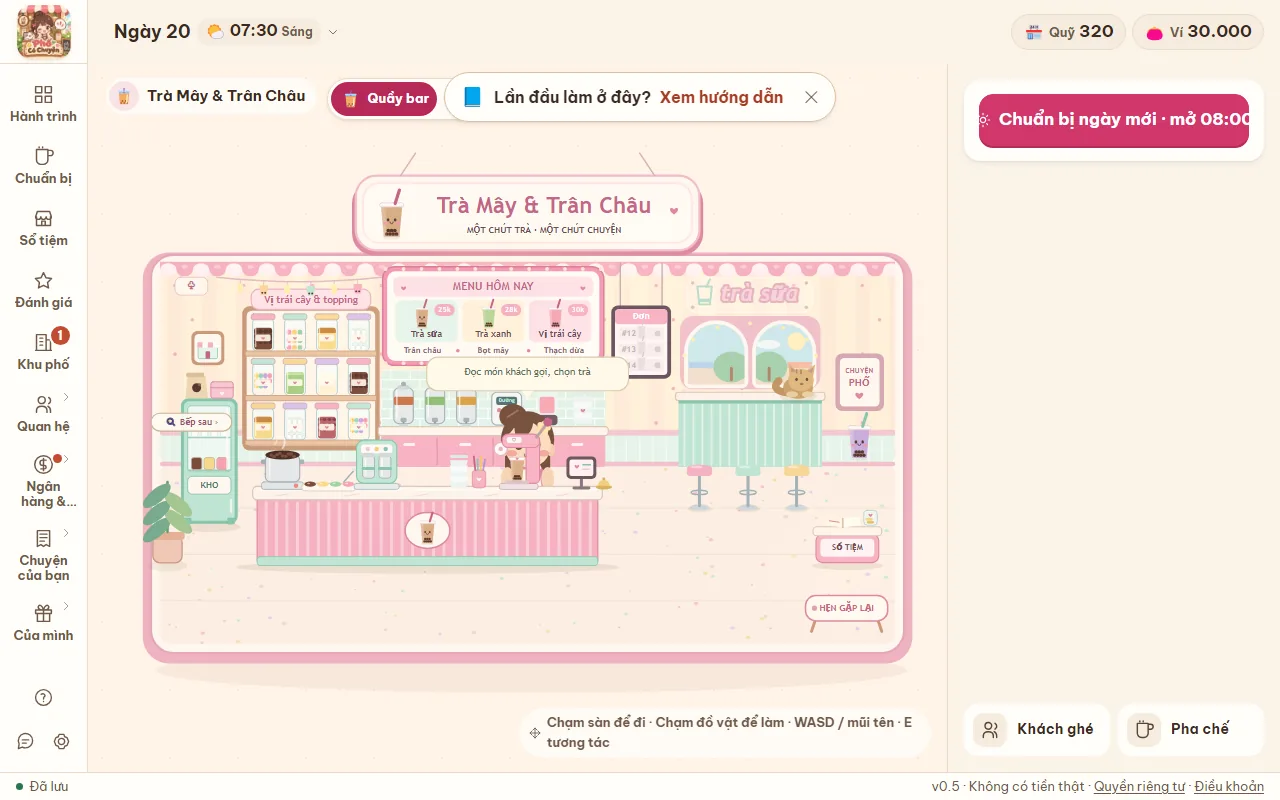
In Phố Có Chuyện, the TrioX job simulation game, the loop at the bubble tea shop goes like this: open your shift, take an order, layer the drink, receive the customer's rating, then spend what you earned on life after work, such as renting a room or fixing up your home. Each job has its own workstation, but the rhythm is shared, so switching jobs still feels familiar.
How to check your own loop:
- Describe it in one sentence. If you need a paragraph, it is probably still muddy.
- Build a rough prototype with boxes and buttons, no art. If it is already a little fun, you are on the right track.
- Ask whether the tenth repetition feels different from the first. If not, add variables: new customers, new obstacles, new choices.
Goals: what is the player trying to achieve?
Goals are the reason players keep tapping. Good games usually layer them:
- Short term: clear this level, serve this customer.
- Mid term: unlock a new chapter, upgrade the shop, complete a collection.
- Long term: finish the story, master every mechanic.
Goals should be obvious on screen. Players who do not know what to do leave quickly. In a puzzle game like CUTVERSE, each level's goal fits in one line: get Mimo to the glowing door. The challenge is in how, not in understanding the task. Optional stars give extra goals to anyone who wants more.
Feedback: what is the game telling the player?
Feedback is every signal the game sends back after an action: sound, motion, numbers, messages. Without it, players cannot tell whether they did well.
A few easy principles:
- Immediate: every tap gets a response, even just a button press animation or a click.
- Readable: success and failure must look clearly different.
- Proportional: small actions get small feedback, big achievements get big feedback. Fireworks on every tap make fireworks meaningless.
- Explanatory: after a failure, players should be able to guess why.
Phố Có Chuyện uses an interesting kind of feedback: after each situation, you see what the customer, your coworker and the owner experienced. Feedback becomes not just right or wrong, but consequences seen from several sides.
Difficulty: challenge that fits
Good difficulty sits just a little above the player's current skill. Too easy is boring; too hard is discouraging.
How to build a difficulty curve:
- Teach one thing at a time: introduce a new mechanic in a simple level and let players discover it.
- Practice: a few levels that use it in different ways.
- Combine: mix the new mechanic with older ones.
- Test: one harder level where players prove they understand.
CUTVERSE follows this idea across 200 levels and 12 chapters, bringing in keys, bounce pads, portals, wind, switches and shields over time. So nobody stays stuck forever, it offers step-by-step hints, undo, redraw and the option to leave a hard level for later. These are safety valves that keep players around without making the game easier. If you enjoy the genre, our article on physics puzzle games goes deeper.
Pacing: alternate tension and rest
Pacing is how a game arranges moments of tension and moments of rest. Constant tension wears players out; constant calm puts them to sleep.
- After a hard level, offer an easy one or a reward.
- Split content into reasonable sessions with natural stopping points, especially on mobile.
- Mix activity types: in Phố Có Chuyện, after work you rent a room, fix up your home or visit other players' shops.
- Place surprises well: a strange customer, a new mechanic, a short story beat.
Pacing varies by game genre. Relaxing games need a slow rhythm, action games a fast one, but every genre needs breathing room.
Playtesting with real players
Playtesting with real players is the only way to know how your game actually works. Developers know their game too well to see it with fresh eyes.
A simple playtest routine for a small team:
- Pick people who have never seen the game, as close to your target players as possible.
- Do not explain anything. Hand over the device, stay quiet and watch. Wherever you feel the urge to explain is where the game needs fixing.
- Ask them to think out loud: "I think this button is for...".
- Record behavior, not just words: where they quit, what they mis-tap, where they smile.
- Ask questions at the end: what was most fun, what was most confusing.
- Fix and test again with new people.
Test early and often, starting while your game is still boxes. Fixing a loop in a prototype is far cheaper than fixing it after all the art is done.
Frequently asked questions
Where should beginners start learning game design?
Make a tiny game with a single mechanic and finish it. Then play games consciously: write down the loop, the goals and how the game teaches you. Our guide to indie game development has a more detailed roadmap.
Do I need to code to design games?
Not necessarily. You can test ideas with paper, cards and dice. Knowing a game engine, though, lets you validate ideas faster on your own.
How many playtesters are enough?
There is no fixed number. A handful of people per round often reveals the biggest problems; what matters is running several rounds after each change.
These fundamentals apply both to browser games like Phố Có Chuyện and to iPhone games like CUTVERSE, which TrioX Studios is building. TrioX builds apps, games and AI solutions on request. Get in touch via our home page.