What is on-device AI? Pros, cons and when to use it
What on-device AI is, its pros and cons, why it works offline and keeps data private, and where small models hit their limits. With an example from Scanmora.
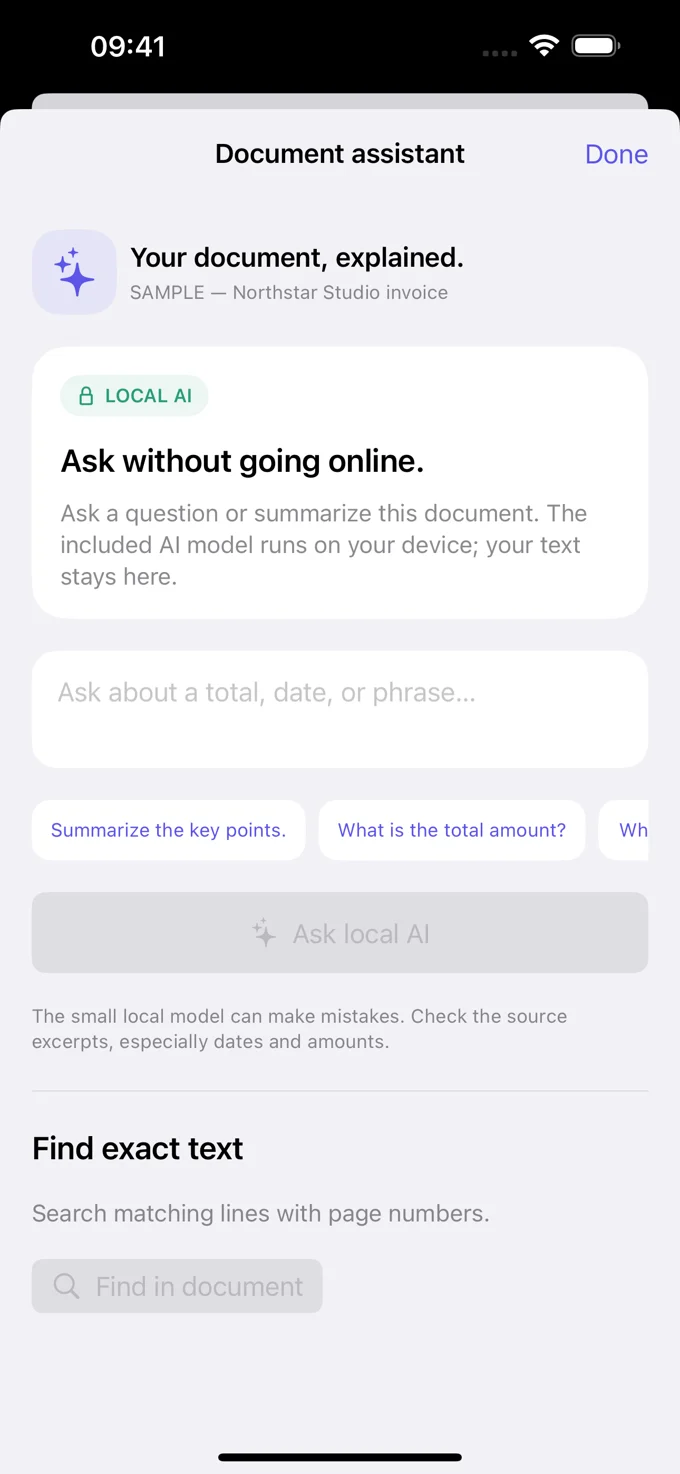
On-device AI means the AI model runs directly on your phone, tablet or computer instead of sending your data to a server. That lets AI features work without a connection and keeps your data on the device. This article explains what on-device AI is, where it shines, where it struggles and when to choose it.
What on-device AI means
On-device AI means the entire inference step, the moment the model takes a question and produces an answer, happens on the user's own device. The model is bundled with the app or downloaded once, then runs on the device's own processor.
That is different from cloud AI, where the app sends the question and data to a server, the server runs the model and returns the result. Most of the popular chat assistants today work the cloud way.
On-device AI has actually been on phones for years in forms few people notice: face recognition for unlocking, keyboard word suggestions, text recognition in photos. What is new is that small language models are now compact enough to run on a phone, so apps can summarize and answer questions without a server.
The advantages of on-device AI
The biggest advantage of on-device AI is that data stays on the device. For personal documents, photos, notes or work files, that matters a lot.
- Privacy: questions and content do not go to the developer or any AI provider. Users do not have to wonder where their data is stored or whether it trains a model.
- Works offline: on a plane, in a weak signal area or without mobile data, the feature keeps working.
- No per-call fee: the developer does not pay for each question, so users can use the feature more freely.
- No account needed: no sign-in, no API key, fewer setup steps.
- Independent of the network: speed is not affected by a shaky connection.
Drawbacks and the limits of small models
The main limit of on-device AI is that the model has to be small enough to fit a phone's memory and processing power. Smaller models know less and reason less well than large models in the cloud.
- Narrow knowledge: a small model should not be treated as an encyclopedia. It easily gets things wrong when asked about anything outside the content it was given.
- Short context: the model can only process a limited amount of text at once, so the app usually picks a few relevant passages instead of feeding in a whole long document.
- Bigger apps: the model file adds noticeably to the app's download size.
- Battery and heat: inference is compute heavy, especially for long answers.
- Device differences: newer devices run fast, older ones may be slow or short on memory, so testing across devices matters.
- Slower updates: changing the model usually means shipping a new app version.
What small models do well
Small models work well when the task has a clear scope and the content is handed to them. In other words, let the model read and then answer, rather than remember and then answer.
Tasks that suit on-device AI:
- Summarizing the text the user is looking at.
- Answering questions from excerpts of a specific document.
- Classifying, tagging or pulling out a few simple details.
- Rewriting a sentence to be shorter or in a different tone.
Tasks better left to large cloud models: analyzing many documents at once, multi-step reasoning, long writing that needs broad knowledge, or general questions about the world.
An example from TrioX: the document assistant in Scanmora
Scanmora is a document scanning app for iPhone and iPad that TrioX Studios is finishing, and its AI assistant runs entirely on the device. According to the app's privacy policy, the Qwen2.5-0.5B-Instruct model and the llama.cpp inference engine are bundled with the app, so there is no model download, server, API key or AI provider account involved.
When we built this part, we designed the assistant around the limits of a small model:
- The assistant only processes the question you type and selected text excerpts from the document you have open. It does not search other documents in your library.
- Each question starts a fresh model context, and closing the assistant cancels its work.
- Documents, recognized text, questions and answers are not sent to us or to any other AI service, including for model training.
- The app says clearly that answers can be incomplete or wrong, and that you should check them against the original document.
Scanmora is not on the App Store yet. You can read the full introduction in Scanmora: document scanning with offline AI.
When to choose on-device AI
Choose on-device AI when the data is sensitive, when people need the feature without a connection, or when the feature is used so often that server costs are hard to control. Choose cloud AI when complex tasks need high quality, or when your app runs in a browser.
Many products combine both: light, private tasks run on the device, while heavy tasks go to a server after the user agrees. If you are weighing the two, our article on adding AI to a mobile app has a checklist to help you decide. If your feature is built around paperwork, see AI document reading and OCR.
Frequently asked questions
Does on-device AI work with no internet at all?
If the model is bundled with the app, as in Scanmora, the AI part works offline. Some other apps need to download the model the first time and only then run offline.
Is AI on a phone as accurate as ChatGPT?
Usually not, because on-device models are much smaller. Still, when given the right document passage to read, a small model can answer many practical questions. Whichever you use, check the results.
Does on-device AI drain the battery?
Yes, while the model is running. For short questions asked now and then, the battery impact is usually not a concern. Developers should cap answer length and let users stop a response midway.
TrioX builds apps, games and AI solutions to order, including on-device AI features. If you would like to talk, get in touch on our home page.