Scan documents with AI that runs on your iPhone, no internet needed: how Scanmora does it
Scan documents, recognize text and ask an AI about them right on your iPhone, offline. What on-device AI is, what it does well and its limits, with Scanmora.
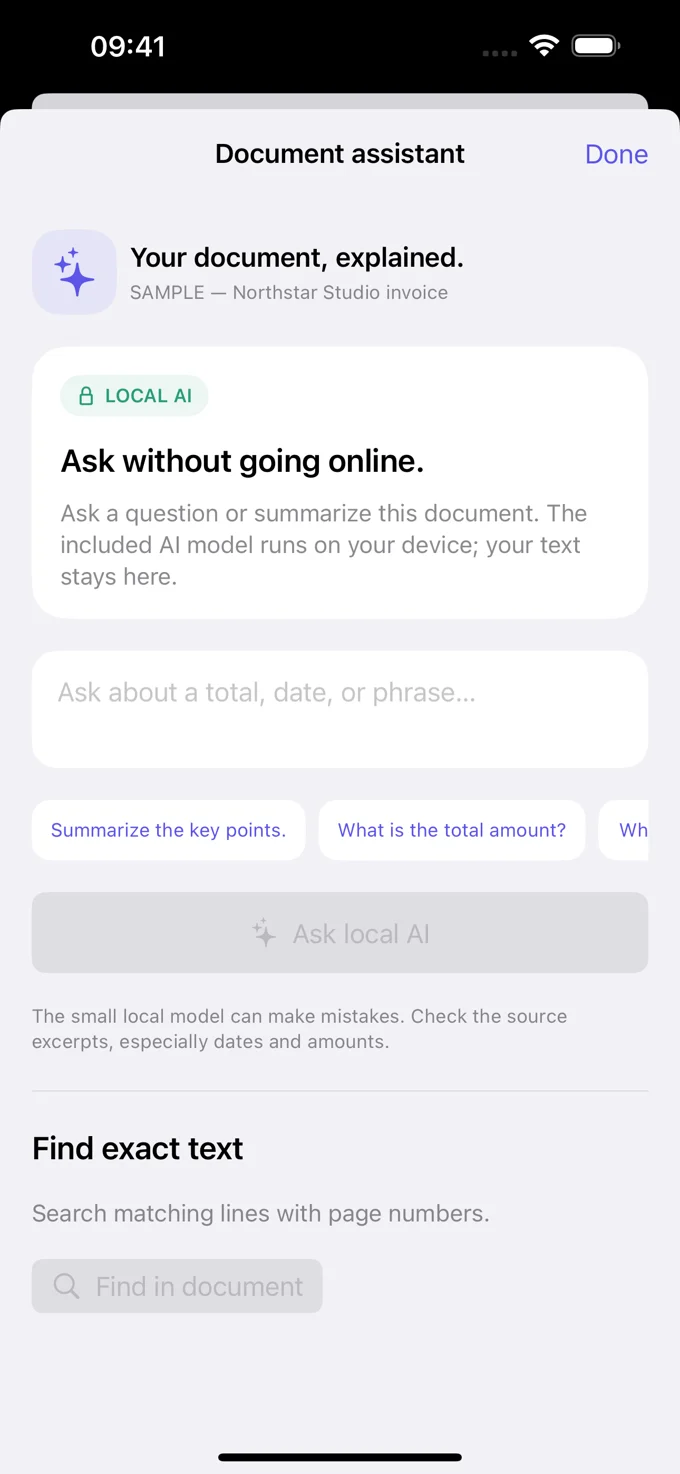
Scanning documents with AI that runs on your iPhone means capturing the page, recognizing the text and asking questions about it all happen inside the phone, without sending your paperwork to a server. This article explains how that kind of app works, what it does well and where you still need to double-check, using a real example: Scanmora, the document scanner TrioX Studios is finishing for iPhone and iPad.
If you only need to scan a few pages with the tools already built into iOS, our guide on scanning documents with an iPhone walks through Notes and Files. This article goes one step further: using AI to read and answer questions about what you scanned.
What is on-device AI?
On-device AI is a model that ships with the app and runs on the phone's own chip, instead of sending your data to a remote server and waiting for a reply. When you ask something, the question and the document stay on the device, and the answer is generated there too.
For paper documents this matters more than for most apps. Receipts, contracts, medical forms and family records are some of the most private things people keep. Uploading them just to ask "when is this due?" is a steep privacy price for a small convenience. We go deeper into the idea in on-device AI explained.
From paper to answer: three layers
A document scanner with AI usually works in three layers, and each one has its own limits.
- Capture and clean up. The camera takes the page, then the app crops, straightens and boosts contrast so the text is clearer. The sharper the image, the better everything after it works.
- Text recognition (OCR). OCR turns pictures of letters into machine-readable text you can search, copy or hand to an AI. This step decides a lot: if OCR misreads a number, the AI will repeat the mistake. Our article on AI document reading and OCR covers how OCR works.
- Understand and answer. A language model reads the relevant text and summarizes it or answers your question.
In Scanmora, all three layers run on your iPhone or iPad. Scanning, OCR, PDF processing, library search and AI inference need no remote processing service.
How Scanmora puts the model inside the app
Scanmora bundles the Qwen2.5-0.5B-Instruct model and the llama.cpp inference engine inside the app. The "0.5B" means roughly half a billion parameters, far smaller than server-scale models and compact enough to run on a phone.
Because the model is already in the app, there is nothing extra to download, no API key and no AI provider account, and the assistant still answers in airplane mode. Scanmora doesn't connect to any hosted AI service, including a hosted Qwen service. Documents, images, OCR text, questions and answers are not sent to the developer or any third party, including for model training.
At TrioX this was a deliberate choice. The first Scanmora build used keyword search on the device, and AI-generated answers had to go through an optional server. For version 1.0.0 we moved the model into the app so paperwork never has to leave the phone.
What a small model does well, and where to be careful
A small on-device model handles questions tied to one specific document well: summarizing the main points, finding the total on an invoice, pointing out a signing date or a recipient's name. Scanmora's assistant even suggests prompts like "Summarize the key points" and "What is the total amount?".
It also has clear limits worth knowing up front:
- It can be wrong or incomplete. Small models slip more often than large ones, especially with dates and amounts. Scanmora says so right on the assistant screen.
- It only reads the open document. The assistant uses your question plus selected excerpts from the document you have open. It doesn't search your whole library. For that, use the search field, which covers names, tags and text.
- It doesn't remember the last question. Every question starts a fresh context, so put everything you need into one question.
- It depends on scan quality. Blurry photos, crumpled paper and hard-to-read handwriting weaken OCR, and the AI can only work with the text that was recognized.
Tips for answers you can trust
How you ask matters a lot with a small model. A few habits help:
- Be specific. "What is the payment due date on this invoice?" beats "What does this invoice say?".
- One thing per question. Ask about the total and the due date separately.
- Check the source. For amounts, dates and contract numbers, use the assistant's exact-text search. It lists matching lines with page numbers so you can open the right spot and check.
- Rescan when needed. If the recognized text looks badly off, rescan the page in better light rather than pushing the AI harder.
Beyond AI: what else Scanmora does
AI is only one part. Most of the time you use Scanmora as a scanning and organizing app:
- Scan with the camera or import photos and PDFs; crop, rotate and apply filters.
- Organize with folders, tags and favorites; search by name, tag and the text inside.
- PDF tools: merge, extract pages, rotate, compress, export JPG or TXT and share a password-protected copy.
- Sign, add markup or redact sensitive details on a copy before sending it.
- Lock the app with Face ID, Touch ID or your passcode; deleted documents wait in Trash until you remove them permanently.
If you are about to digitize a whole drawer of paperwork, our guide to organizing family documents has tips on naming and folders before you start scanning.
Frequently asked questions
Is Scanmora on the App Store yet?
Not yet. Scanmora is in development for iPhone and iPad (iOS 17 or later) and is coming soon. Follow the Scanmora page to see when a download link is available.
Does the AI assistant work without internet?
Yes. The model is bundled in the app, so the assistant answers and summarizes even when you are offline.
Do my documents ever leave the device?
Only when you choose to export, share or save them to another app or service, or when your device or iCloud backup includes the Scanmora library. Otherwise the app doesn't send document content to the developer or a third-party AI service.
Does Scanmora cost anything?
Under the current policy, version 1.0.0 is free for every included feature, the AI assistant included, with no in-app purchases or subscriptions.
If your business needs an AI solution that reads documents in its own workflow, TrioX builds apps, games and AI solutions on request. Get in touch on the home page.