How to choose safe games and apps for kids: age ratings, ads, data and screen time
How to choose safe games and apps for children: check age ratings, ads, in-app purchases and data privacy, play together and agree on sensible screen time.
A safe game for kids is one with age-appropriate content that does not push children to tap ads or buy things, collects as little data as possible and keeps adults in control. That sounds simple, but not every app labeled "for kids" meets these standards. This guide shows how to check each point before you hand over a phone or tablet.
What makes a game safe for kids?
A safe game for kids is about more than avoiding violent content. You can do a quick check with five questions:
- Is the content right for your child's age and stage of development?
- Are there ads, and how do they appear?
- Are there in-app purchases, and do they need an adult's approval?
- What data does the app collect? Does it need an account or allow chatting with strangers?
- Does the game have natural stopping points, or does it push your child to keep playing?
No app is perfect, but answering these five questions will help you rule out many worrying options.
Check the age rating, but not only the age rating
An age rating is a good starting point. The App Store and Google Play both show an age rating for every app, and many games also carry ratings from systems such as ESRB in North America or PEGI in Europe.
However, ratings mainly assess content like violence or language, and they may not tell you everything about how ads appear or what the experience is really like. Read the description, look at the screenshots and, if you can, play for a few minutes yourself before handing it over.
For young children, favor games with simple rules, little text, spoken instructions and nothing frightening.
Ads and in-app purchases
Ads and in-app purchases are the two things parents should check most carefully, because young children struggle to tell game content apart from ads or offers.
- Ads: watch out for full-screen ads with tiny close buttons, ads that lead outside the app and "watch an ad to get a reward" prompts. A game with no ads is still the most reassuring choice.
- In-app purchases: the store listing usually states this clearly. Be wary of random loot boxes, virtual currencies that hide real prices, and messages like "your pet will be sad if you don't buy this".
- Turn on parental controls: iPhone and iPad offer Screen Time and Ask to Buy through Family Sharing. Android has Google Family Link and an option to require authentication for purchases on Google Play. Setting names and locations can change between versions, so check Apple's and Google's official help pages.
Your child's data and privacy
A good app for kids collects as little data as possible and lets parents view and delete it. A few things to check:
- Look at the app privacy section on the App Store and the Data safety section on Google Play.
- Does the app require an account, an email address, photo uploads or location access?
- Does it have chat, friend features or a public gallery? If so, who can message your child?
- Is there a clear way to delete data?
- Do external links and sharing require an adult to confirm first (often called a parental gate)?
If you build apps and want to know what developers need to disclose, our article on privacy policies for apps explains it in detail.
Play together
Playing together is the simplest way to find out whether a game really suits your child. Sitting beside them for the first few sessions shows you how well they understand the rules, whether the game frustrates or scares them, and whether anything leads outside the app.
- Ask what they are doing and why they chose it.
- Connect the game to real life: colors, animals, things around the house.
- Praise effort more than results.
- With drawing apps, look back at their pictures together.
Our article on drawing apps for kids has more ideas for turning screen time into creative time.
Sensible playing time
Playing time works best when it is agreed in advance, fits your child's age and does not cut into sleep, meals or physical activity. Every family is different. For specific screen time recommendations by age, consult a pediatrician or a child health professional.
- Choose games with natural stopping points: short levels, clear chapters.
- Be careful with daily login rewards and streaks, which can pull children back.
- Give a few minutes' warning before time is up.
- Use the device's time limit tools if needed.
If your child shows signs of poor sleep, irritability or long-lasting difficulty stepping away from screens, talk to a doctor or specialist. Our article on children's screen time has more suggestions for families.
Examples from TrioX: Mèo Tò Mò and Mầm
Here are two products from TrioX Studios you can compare against the questions above:
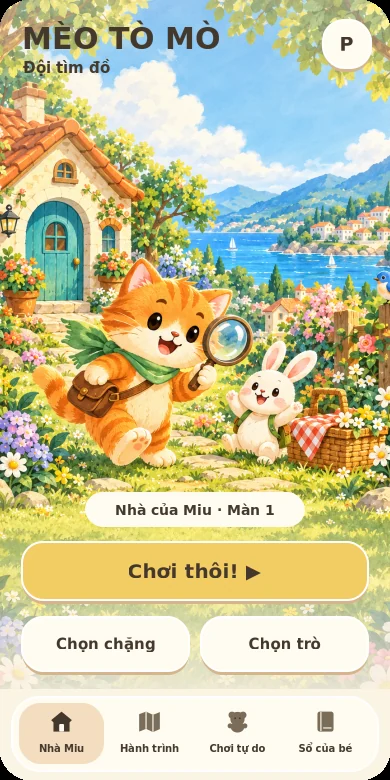
- Mèo Tò Mò is a Vietnamese-language app for iPhone and iPad, currently being prepared for release, with 11 games, a 48-level journey and a drawing corner with 48 coloring pages. The current version has no ads, in-app purchases, accounts, tracking, chat or public picture gallery. It works offline, and progress and drawings stay on the device. The parent area is behind a simple maths question and lets adults review recent activity, change settings and delete data. Sharing pictures and opening external links both require this adult confirmation step.
- Mầm is a classroom learning platform. Students join a room with a code from their teacher and a display name, with no personal email needed. Team games run on one shared screen led by the teacher, and parents can see shared results and comments through an account linked to their child. Read more in review games for the whole class.
Frequently asked questions
Are free games safe for kids?
Not necessarily. Many free games make money from ads or in-app purchases, so you still need to check both. On the other hand, some free games have neither.
At what age should children start playing games?
There is no single age that fits every family. Use the age rating, your child's development and advice from a pediatrician or education specialist.
How can I tell whether an app collects my child's data?
Check the privacy label on the app store, read the app's privacy policy and notice whether it asks for an account, email, or access to photos or location.