CUTVERSE: an offline gravity puzzle game for iPhone where one cut flips the world
CUTVERSE is an offline gravity puzzle for iPhone: draw one cut that splits two directions of pull and guide Mimo home across 200 levels. Rules, mechanics, tips.
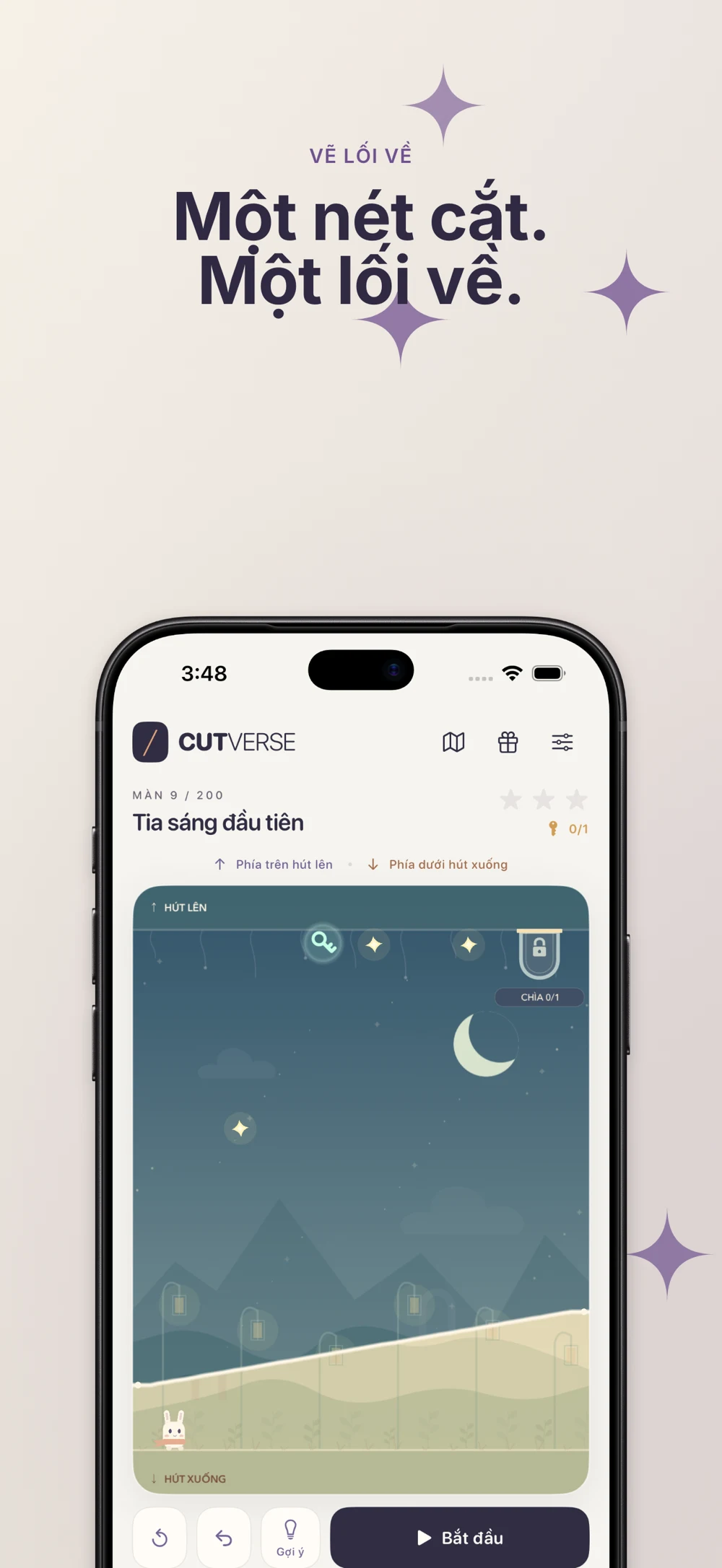
CUTVERSE is a gravity puzzle game for iPhone where you draw one cut that splits the level into two directions of pull: everything above it pulls up, everything below pulls down. Your job is to help Mimo grab the key and reach the glowing door across 200 levels, entirely offline. This article covers the rules, the mechanics, some solving tips and what to know about the game TrioX Studios is preparing to release.
What is CUTVERSE?
CUTVERSE is a physics puzzle game, the kind where the solution comes from predicting how something will move rather than from fast reflexes. If the genre is new to you, our article on physics puzzle games introduces the common styles and why they are so satisfying.
What sets CUTVERSE apart is that you never control the character. You draw one line, tap Start and watch Mimo move under the gravity your line creates. There are 200 levels across 12 chapters, with 600 optional stars to chase.
The rules in one sentence
The rules of CUTVERSE fit in one sentence: above your line pulls up, below it pulls down.
Each level follows the same loop:
- Look. Note where Mimo, the glowing key, the locked door and the stars are.
- Draw. Drag one line from left to right. It splits the level into two gravity zones; it is not a path for Mimo to walk.
- Start. Tap Start and watch. Mimo keeps momentum, so crossing the boundary doesn't flip direction instantly; Mimo carries on for a moment first.
- Adjust. If it doesn't work, undo, redraw or open a hint.
The key is required to open the door. Stars are optional, and you can come back from the map to collect them later.
From level 1 to 200: new mechanics
Every stretch of the journey adds something new that makes you rethink where to place your cut. Here is what you will meet along the way:
- Bounce pads launch Mimo upward and change the arc.
- Paired portals move Mimo from one point of the level to another.
- Wind shows up around level 61 and pushes Mimo along its current.
- Moving thorns in level 101 make you time things, not just place them.
- Switches in level 121 open new paths.
- A shrinking seed in level 145 makes Mimo tiny.
- A shield in level 185 protects Mimo.
Each chapter has its own atmosphere, from glowing gardens and mirrorwood to the new lands beyond. The journey map opens from the map icon at the top of the screen.
Tips for gravity puzzles
Most hard levels in a gravity puzzle open up once you think about trajectories instead of paths. A few tips that work for CUTVERSE and similar games:
- Start from the goal. Look at the door and the key first, ask where Mimo needs to fall or rise, then place your line.
- Account for momentum. Mimo doesn't stop the moment it changes zones. If Mimo keeps overshooting the key, move the switch point a little earlier.
- Change one thing at a time. When redrawing, move only one end of the line so you can see which change caused what.
- Use hints step by step. CUTVERSE reveals hints one step at a time, so you can peek at the first step and solve the rest yourself.
- Leave tough levels for later. Mark a level to play later and come back with fresh eyes. The answer often arrives when you stop forcing it.
What offline, free and ad-free mean here
In CUTVERSE, offline means playing, claiming rewards, unlocking hints and changing outfits all run on your iPhone, with no internet or account. You only need a connection if you choose to open the support website or send an email. If you often play on flights or with a weak signal, our article on offline games has more ideas.
Free in version 1.0 means all 200 levels, reward chests and eight outfits are unlocked through play. Lights, the in-game reward, come only from levels, chests and a daily task, and can't be bought with money. There are no in-app purchases, subscriptions or ads.
The game also has no analytics or tracking SDK and doesn't ask for camera, microphone, contacts or photo library access. Progress is saved on the device and doesn't sync between devices, so deleting the app can remove your save.
A note from TrioX on making CUTVERSE
At TrioX, we built all 200 levels of CUTVERSE around a single rule: above pulls up, below pulls down. It is just one line, but its position, its slope and the moment Mimo meets the boundary create many different solutions, and mechanics like wind, switches and shields keep adding new layers.
One change while finishing the game was removing in-app purchases entirely for version 1.0. We had once planned to sell an outfit set through Apple; in version 1.0, all eight outfits unlock with lights or milestone chests, so every one of them comes from playing. If you are curious how a small studio makes games, our piece on indie game development tells more of that story.
Frequently asked questions
Is CUTVERSE on the App Store yet?
Not yet. CUTVERSE is preparing for release on iPhone with iOS 17 or later. Follow the CUTVERSE page to see when a download link is available.
Is the game available in English?
Yes. In Settings you can choose Vietnamese, English or your device language, along with sound, haptics and reduced motion options.
Does replaying the journey remove my unlocked hints?
No. Replaying the journey from the start resets progress, stars, lights, rewards and outfits, but keeps unlocked hints and settings.
Can children play?
CUTVERSE is a general-audience puzzle game with no chat or social features, and it doesn't ask for personal information. Families can use Apple Screen Time to manage play time.