Isometric and 2.5D graphics in games: concepts, techniques and tools
What isometric and 2.5D game graphics are, why so many games use them, and how to handle diamond grids, coordinates, depth sorting and the right tools.
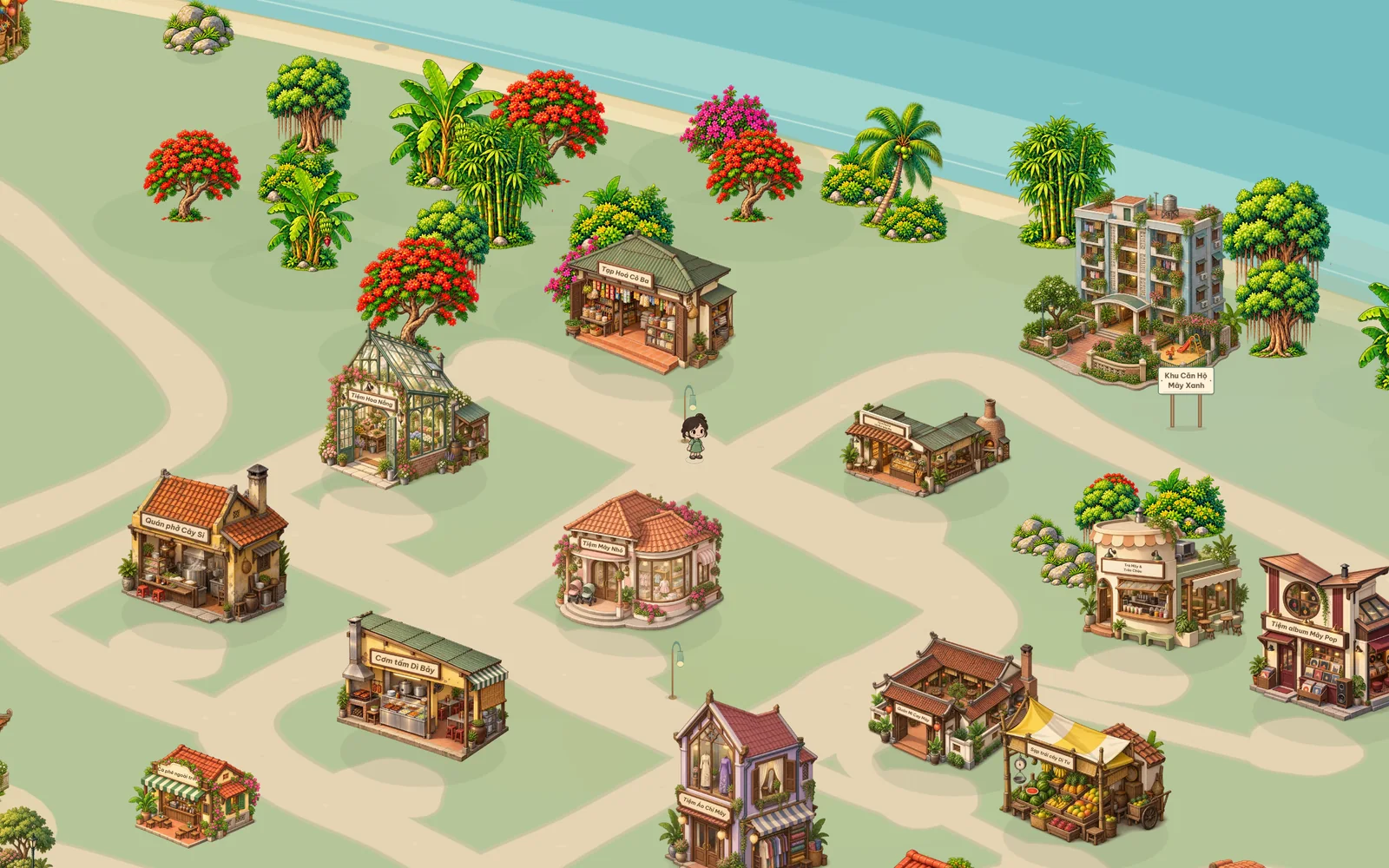
Isometric graphics show a game world from a diagonal, top-down angle, so a flat screen feels like it has depth. It is a favorite for simulation, building and role-playing games because it is easy to read and feels three-dimensional without real 3D. This guide explains the concept, the core techniques and the tools to get started.
What are isometric and 2.5D?
Isometric projection is a parallel projection in which the three spatial axes appear at equal angles, and distant objects do not shrink the way they do in true perspective. Games usually use a "2:1 isometric" variant: each floor tile is a diamond twice as wide as it is tall, for example 128 by 64 pixels. Strictly speaking that ratio is closer to a dimetric projection, but game developers call it isometric anyway because it draws so cleanly on a pixel grid.
2.5D is a broader label for games that sit between 2D and 3D. There are two main kinds:
- 2D art, 3D feel: the world is drawn with 2D images arranged at an angle to suggest depth. Most isometric games belong here.
- 3D art, 2D play: real 3D models, but characters move on a single plane, like many modern side-scrollers.
Why do so many games use an isometric view?
An isometric view lets players see the ground, the front and one side of everything at once, which makes spatial layouts easy to understand. Other reasons:
- See the whole area: ideal for city builders, shop managers and farming games where players need an overview.
- Depth without the weight: it is all 2D images, so it runs well in browsers and on modest phones.
- Reusable pieces: one set of tiles, walls and trees can build many different maps.
- A cozy feel: it is like looking at a miniature model, which suits relaxing and cozy games.
A close-to-home example is Phố Có Chuyện, the job simulation game from TrioX Studios. Its seaside neighborhood is a 2.5D isometric map where players stroll around, tap a shop to start a shift and drop by other players' shops.
Diamond grids and coordinates
The diamond grid is the foundation of every isometric map: the world is still stored as a normal square grid, and only "rotates" into diamonds when drawn on screen.
You work with two coordinate systems:
- World (grid) coordinates: tile (x, y), like a chessboard. Game logic such as collisions, pathfinding and placement lives here.
- Screen coordinates: the pixel position where things are drawn.
To convert from grid to screen, with half tile width w and half tile height h:
- screen X = (x - y) times w
- screen Y = (x + y) times h
To go the other way, for example when a player taps the screen and you need the tile:
- x = (X / w + Y / h) / 2
- y = (Y / h - X / w) / 2
In the Phố Có Chuyện source code, the projection function uses exactly this form with a 64 by 32 pixel half tile, plus an inverse function that turns taps and arrow keys into movement on the grid. The key rule: keep logic in grid coordinates and convert to screen only when drawing. Mixing the two is one of the most common beginner bugs.
Depth sorting
Depth sorting decides what covers what. In isometric views, objects "in front" sit lower on the screen, so they must be drawn later.
A simple approach that works well:
- Put each sprite's origin at its feet (the middle of its bottom edge), not at the top corner.
- Use the screen Y of the feet as the depth value. Higher Y draws later.
- For moving characters, update depth whenever their position changes so they walk naturally behind trees and buildings.
- Large objects spanning several tiles, such as buildings, need depth based on the corner nearest the viewer, or should be split into parts.
Phố Có Chuyện uses this same idea: buildings, trees and characters are anchored at their feet and sorted by screen Y. The ground is pre-rendered into a single background image, so individual tiles do not need redrawing every frame.
Drawing isometric assets
Isometric assets must be consistent in angle, light direction and scale, or the map will look off. A few tips:
- Pick one tile ratio (usually 2:1) and stick to it everywhere.
- Agree on a light direction, for example from the top left, so shadows fall the same way.
- Sprites already drawn at an isometric angle should only be scaled uniformly, never projected again.
- Characters that walk in several directions need at least four diagonal facings, or you can mirror sprites to save work.
Many teams build simple 3D models and render them as 2D isometric images, keeping the angle precise while the game stays as light as 2D.
Tools worth using
The right tools depend on your target platform:
- Phaser: a 2D game framework for the browser, written in JavaScript or TypeScript. Phố Có Chuyện builds its street map with Phaser. A good fit for web game development that runs straight in the browser.
- Tiled: a free map editor with an isometric mode that exports files many engines can read.
- Godot and Unity: both have tilemap tools with isometric support, good for installable mobile and desktop games.
- Aseprite: for pixel art tiles and small characters.
- Blender: model in 3D and render isometric sprites.
If you are new, start with a 10 by 10 tile map, one character moving with the arrow keys and a few trees to test depth sorting. Get those three working and you have handled the hardest part. Our guide to indie game development covers the bigger roadmap.
Frequently asked questions
How is isometric different from 3D?
Isometric games usually arrange 2D images at a diagonal angle with no perspective, so distant objects stay the same size. 3D games use real models and can rotate the camera freely.
Can isometric games run in a browser?
Yes. Because they are mostly 2D images, isometric games run well in browsers. Phố Có Chuyện is one example; see our Phố Có Chuyện guide to learn how its neighborhood works.
Is the 2:1 tile ratio required?
No, but it is popular because diagonal lines look clean on a pixel grid and are easy to draw.
TrioX builds apps, games and AI solutions on request. Get in touch via our home page.