Private photo sharing apps for couples, families and friends: how to choose
What makes a private photo sharing app different from social media and group chats? How to choose one for couples, families and friends, with an example from Little Us.
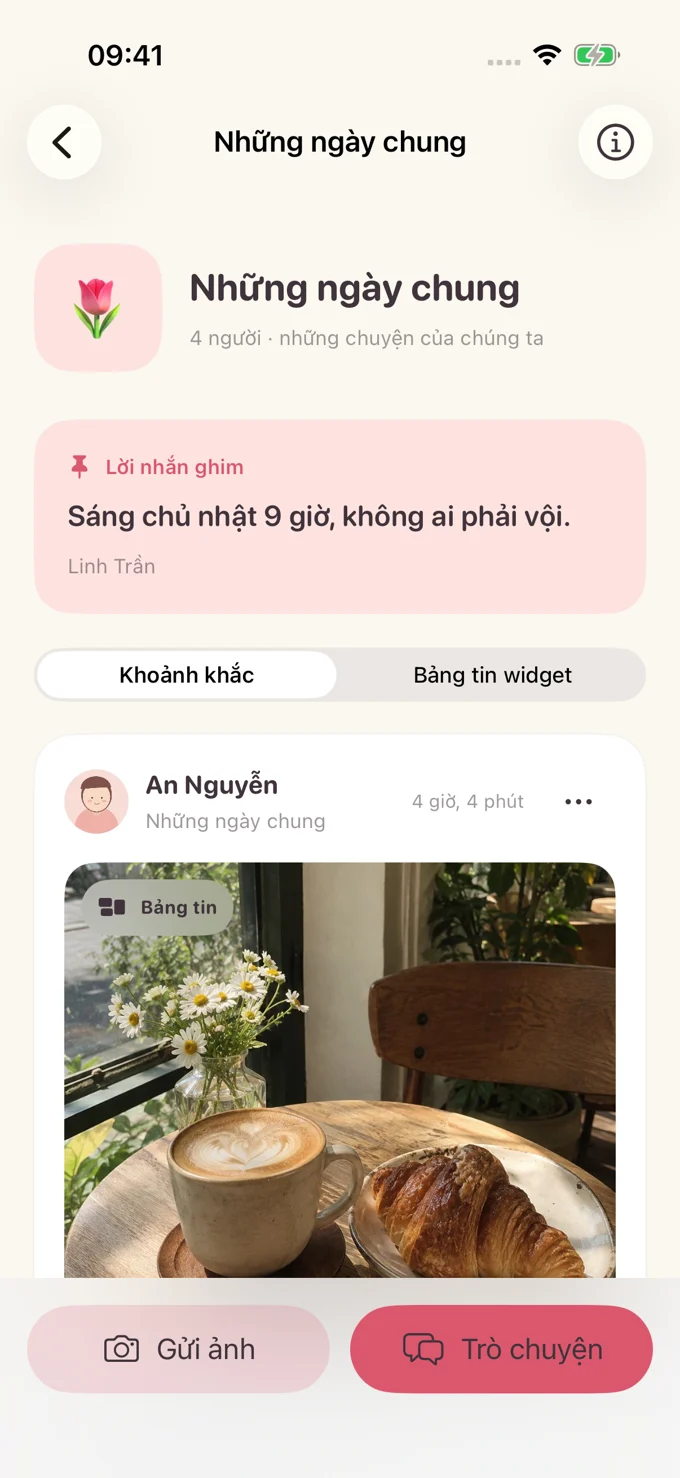
A private photo sharing app lets you send photos to a small group of people you chose in advance, instead of posting them publicly or dropping them into a group chat where they scroll away. If you want somewhere to send a dinner photo to your parents, a weekend snap to your partner or a silly picture to your best friends without wondering who else will see it, this guide will help you pick the right app.
What is a private photo sharing app?
A private photo sharing app is an app where every photo goes only to the people you invited into a small group. There is no public feed, no strangers following you and no algorithm deciding who sees what first.
The difference is intent. Social networks are built for reach. Group chats are built for quick conversation, and photos are just one part of the message stream. Shared albums in your photo library are great for collecting pictures from a trip, but they are rarely where everyday conversation happens. A private photo sharing app tries to bring three things together: the photo, the story around it and a fixed circle of people.
When do you actually need a separate app?
You need a separate app when the small photos of daily life no longer have a good place to go. A few signs:
- You want to share with family, but the family chat is full of forwarded messages and yesterday's photo is already buried.
- You are in a long-distance relationship and want to see each other every day without a long call. Our guide to long-distance relationships has more ideas for this.
- Your close friends want a shared space for silly photos that coworkers and relatives will never see.
- You study or work far from home and want your parents to see you are doing fine without writing long messages. See also staying close to family when you live far away.
6 things to look for
The most important thing is control over who sees your photos. Features come second.
- Closed groups, joined by invitation. New people can only join with a code or invite from you. Check that blocking, reporting and leaving a group are easy.
- Room for the story. Comments right under a photo, replies with another photo, a pinned note for what matters. A photo should not be just a square in a chat log.
- A corner just for you. A personal photo journal that is not shared with anyone lets you keep moments you are not ready to send.
- Present, not noisy. A Home Screen widget is a gentle way to see your people without a flood of notifications. But a widget can also be seen by whoever is sitting next to you, so a good app lets you hide its content.
- A privacy policy you can read. Where photos are stored, whether they are end-to-end encrypted, whether there are ads and how to delete your account. Our article on privacy policies for apps explains which parts to read.
- Works on the devices your group uses. A great app that half the family cannot install will not last.
Questions to ask about your data first
Before sending your first photo, look for answers to these four questions in the app's privacy policy.
- Are photos end-to-end encrypted? If not, the operator can technically access data when needed for support or legal obligations. That is not necessarily bad, but you should know it when deciding what to send.
- Is location data in photos kept? Phone photos often carry EXIF metadata, which can include where the photo was taken.
- Does the app show ads or track you across other apps?
- What happens to photos when you delete your account? Ask about backups too, and remember that no app can recall a copy someone else already saved.
Little Us: how TrioX approached private photo sharing
Little Us, called Tụi Mình in Vietnamese, is an iPhone app made by TrioX Studios. It is available on the App Store, free to download, in English and Vietnamese, and requires iOS 17 or later.
When we built Little Us, we started from the same checklist:
- Private groups joined with an invite code. One-to-one chats open only after an invitation is accepted. Blocking, reporting and account deletion are built into the app.
- Photos with a story. Comment under a moment, react with a heart, reply with a photo or video, pin a note and add a voice recording of up to 20 seconds to a photo.
- A private journal. Journal photos are not shared with group members, and you can search them by caption.
- A widget with a hide option. The widget shows a photo, a collage, a message or a pinned note, and you can hide its text or all of its content.
- Clear about data. Uploaded photos are re-encoded to strip EXIF metadata. There is no third-party advertising SDK. The service is not end-to-end encrypted, and we say so plainly in the app's privacy policy. Usage analytics and crash reports are optional and off by default.
There are fun extras too: paper and stamp frames, photobooth strips, a photo studio with stickers and text, and a spinning CD that plays a short clip of music. We wanted each photo you send to feel more like a little card than a file.
Tips for different kinds of groups
Each kind of group has its own rhythm, so do not use the same approach for all of them.
Couples
Set the widget to show your partner's latest photo. Send one photo a day. It does not need to be pretty, just real. At the end of the month, collect a few favorites into a memory page. Our guide to keeping memories as a couple has more small habits for this.
Families
Pick one person to invite grandparents and parents. Pin a short how-to note at the top of the group. For older relatives, a Home Screen widget is often easier than opening an app.
Friend groups
Agree on a simple rule: if you do not want a photo saved, do not send it. A private app protects you from strangers, but it cannot stop friends from saving a picture.
Frequently asked questions
Is a private photo sharing app completely safe?
No system is completely secure. A private app limits who can see your photos, but you should still read the data policy and think twice before sending highly sensitive pictures.
Is Little Us free?
Little Us is free to download on the App Store for iPhone with iOS 17 or later.
Can group members see my private journal?
No. In Little Us, your personal journal is not shared with group members. Only what you post to a group is visible to that group.
Can I delete my account?
Yes. In Little Us, open Me, choose Delete account and confirm with your password. Content you own is removed from active storage.
If you are looking for a small corner for your favorite people, give Little Us a try. And if you have an app idea of your own, TrioX builds apps, games and AI solutions to order. Get in touch on our homepage.