Little Us: a private iPhone app for photos, journals and widgets with your people
Little Us is a free iPhone app from TrioX Studios for sharing photos in private groups, keeping a journal and putting shared moments on your Home Screen.
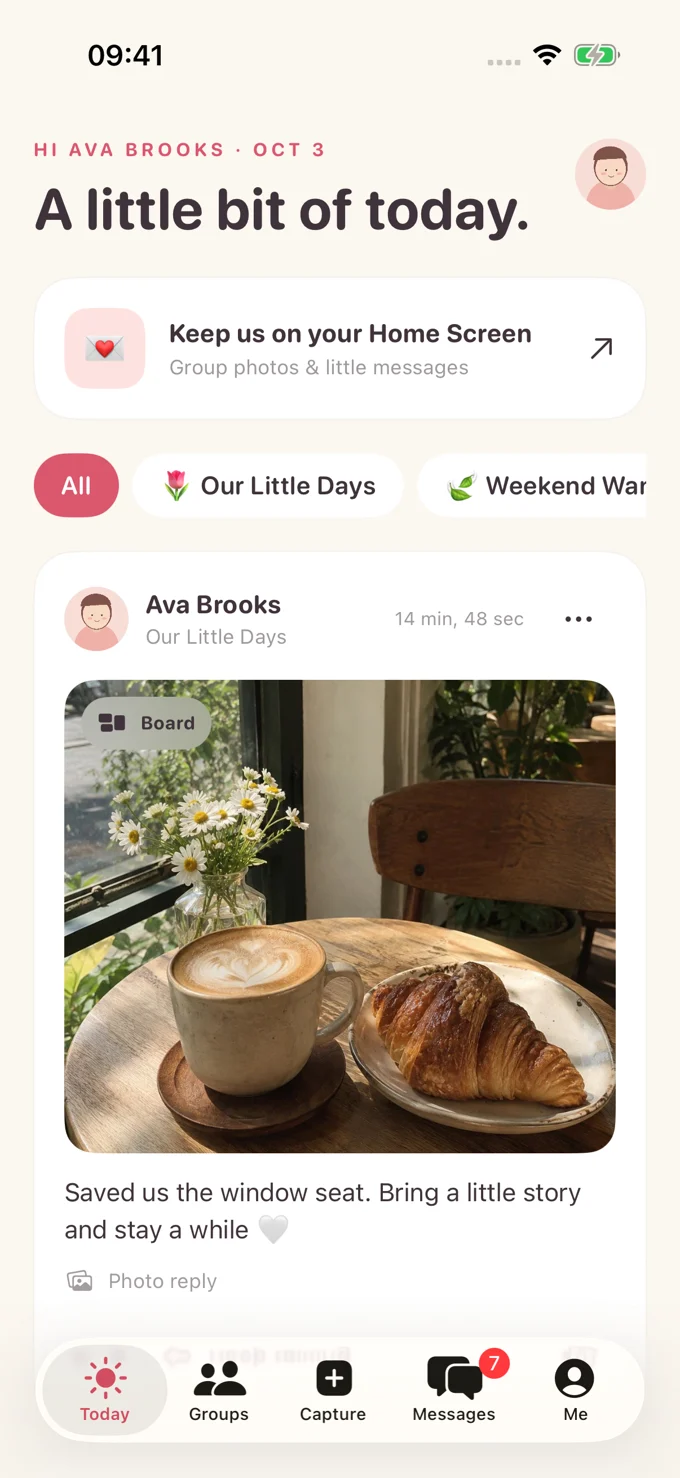
Little Us (Tụi Mình in Vietnamese) is a free iPhone app from TrioX Studios for sharing everyday moments with a small, private group: a partner, close friends or family. You share photos and short messages, talk underneath each moment, keep a personal journal and put chosen moments on a Home Screen widget. It is available now on the App Store.
What is Little Us?
Little Us is a private space for small moments. A photo of breakfast. A message in the middle of the day. Something you want to send to one or two people without posting it for everyone. Social networks are built for audiences. Little Us is built for the handful of people you actually want to tell.
The app is made for iPhone, supports English and Vietnamese, and is free to download on the App Store. You can see screenshots and the full feature list on the Little Us product page.
A small group of your own
The core of Little Us is the private group. You create a group and invite the people you are close to with a code. Inside the group you can:
- share photos and short framed videos;
- react with a heart and chat right under the moment, so the conversation stays attached to the photo it is about;
- reply with a photo of your own.
A group can be two people in a relationship, a few close friends or a whole family. Because only group members see what you post, it is worth choosing the right group before you share.
If you are comparing options, our guide to choosing a private photo sharing app explains what to look for, from who can see your photos to how data is stored.
Closer on your Home Screen
Little Us includes an iPhone widget that shows photos, little messages and moments you choose from your groups. Instead of opening an app to check in, you see the people you care about each time you unlock your phone.
You stay in control of what appears. You pick which moments go on the widget, and you decide whether message previews are shown. Keep in mind that anyone who can see your screen can also see your widget, so choose accordingly. To stop showing something, remove the widget or change its selection.
Keep the whole story, not just the photo
A photo shows a place. A few words remember how it felt. Little Us lets you add more than an image:
- a mood, so you remember how the day felt;
- a caption, so you remember why the photo mattered;
- a short voice note, for the things that sound better said than written.
You can collect moments into shared memory pages with your group. Your personal journal holds photos just for you, and it is not shared with other group members. Later, you can find old photos in your journal by searching their captions.
Who Little Us is for
Little Us suits anyone who wants a quieter, more personal way to stay in touch:
- Couples, especially in the early days or when living apart. Our article on what a couples app should have covers the features worth looking for.
- Families spread across cities or countries, who want something lighter than a group chat. Read small habits for staying close to family when you live far away for more ideas.
- Close friends who want a shared photo space that does not live on a public profile.
- Anyone keeping a personal photo diary, using the journal on its own.
How Little Us handles your data
Little Us uses an account and a server, because sharing moments with a group requires one. Here is what the Little Us privacy policy says, in brief:
- Members of a group can see what you share with that group. Your personal journal is not shared.
- The app does not include third-party advertising SDKs, and TrioX does not sell personal data or use it for advertising.
- From version 1.2.0, usage analytics and crash reporting each have their own switch, and both are off by default.
- Photos are re-encoded on upload to remove embedded EXIF metadata, such as location details stored in the image file.
- Little Us is not an end-to-end encrypted messaging service, so it is best not to share highly sensitive information.
For full details, including how to request deletion, read the policy itself.
How to get started
- Download Little Us from the App Store and create your account.
- Create a group and send the invite code to the people you want inside it.
- Share your first moment, with a caption or a mood if you like.
- Add the Little Us widget to your Home Screen and choose what it shows.
Looking for things to share? Try our list of small things to do together, then use the tips in how to keep your shared memories.
Frequently asked questions
Is Little Us free?
Little Us is free to download on the App Store. Check the App Store listing for current details.
Is Little Us available on Android?
Little Us is currently made for iPhone.
Can other people in my group see my journal?
No. The personal journal is just for you. Only what you share to a group is visible to that group's members.
What languages does Little Us support?
English and Vietnamese.