What should a couples app have? 7 things to check before you install
How to choose an app for couples: privacy, photo sharing, a journal, widgets, anniversary reminders and data safety, with examples from Little Us by TrioX.
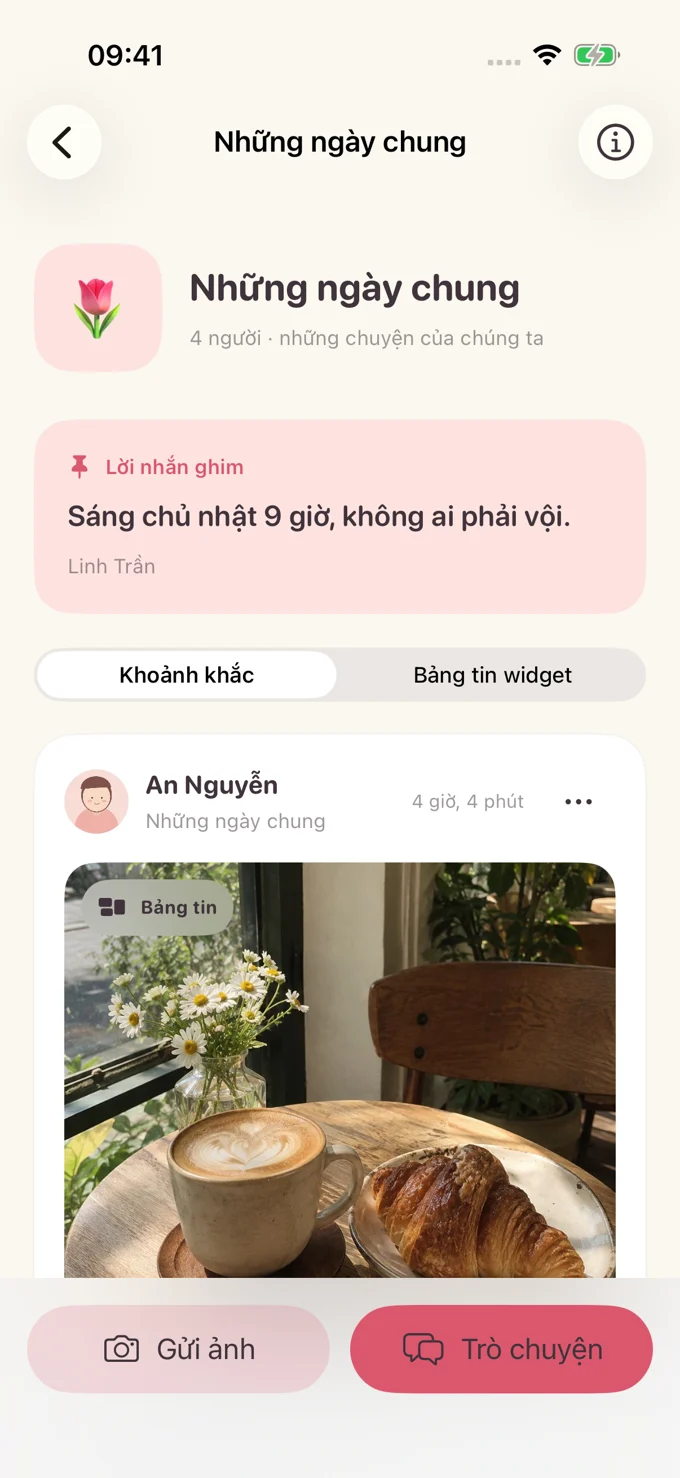
A good app for couples is a place where two people can share private things without worrying who else sees them, and where their data is treated with care. Before you install one, check seven things: real privacy, photo sharing, a journal, widgets, anniversary reminders, data safety, and how easy it is to leave. This guide explains each one, using our own app as an honest example.
A couples app creates a closed space for two people, or a very small group, to share photos, notes and memories. Unlike social media, the goal is not reach. The goal is that exactly the right people see it. That changes what you should look for: you do not need likes or discovery, you need privacy, everyday closeness and peace of mind about the very personal photos you keep there.
1. Real privacy: who can see what?
The first thing to find out is exactly who can see what you post. A trustworthy app explains this in plain words, both in the app and in its privacy policy.
Look for answers to these questions:
- Do people join through a private invite code or link, or can anyone find you by name?
- Is the personal journal really visible only to you?
- Is there end to end encryption? If not, who on the developer side can access content, and when?
In Little Us, an iPhone app made by TrioX Studios, you create a group and invite your people with a code. Your personal journal is not shared with other members. We also state clearly in our policy that the service does not use end to end encryption, and that authorized operators may need access for support, security or legal obligations. Saying this plainly lets you decide what to post.
2. Photo sharing: quick, close and quiet
Photo sharing should let you send a moment in seconds and talk about it right under the photo. Couples mostly share small everyday things: breakfast, the walk to work, a cup of coffee.
Things worth checking: can you add a caption, a mood or a note; can you reply with a photo; does the app handle location data embedded in photos? In Little Us, uploaded photos are re-encoded to remove embedded EXIF data (which can include where the photo was taken), and you can attach a note, a mood or a short voice message. For more on this topic, read our guide to private photo sharing apps.
3. A journal: keep the story, not just the photos
A journal is what turns an app into a place for memories rather than a feed that scrolls away. A useful journal has clear dates, captions and search.
Little Us has a private photo journal you can search by caption, plus shared memory pages that collect a group's moments in one place. If keeping a record is new to you, how to keep your memories together has some easy habits to start with.
4. Widgets: your person on your Home Screen
A widget is a small panel on your phone's Home Screen that shows content without opening the app. For couples, it turns a photo or a note into something the other person sees every time they pick up their phone.
One thing to keep in mind: a widget is visible to anyone who looks at your screen. Little Us lets you choose which moments go to the widget, and our policy notes that you can stop showing content by removing the widget or changing your selection.
5. Anniversary calendars and reminders
Anniversary reminders are a popular request, but not every couples app offers them. Check whether an app supports the solar calendar, the lunar calendar or both, and whether you can set several reminders for one date, such as a week before and a day before.
To set expectations honestly: Little Us focuses on photos, private groups, a journal and widgets. It is not a calendar app. For anniversaries you can use your phone's built in calendar. We are also finishing Lịch Nhà, a Vietnamese lunar calendar app for families that lets you save memorial days, birthdays and events with multiple reminders. Lịch Nhà is coming soon and is not on the App Store yet.
6. Data safety: read the policy before the feature list
An app that holds a couple's private photos deserves to be judged on data before design. Open the privacy policy and look for a few specific things:
- Does the app sell data or use it for advertising?
- Are there third party advertising SDKs?
- Is usage analytics on by default, or is it your choice?
- Where is data stored, and how long are backups kept?
For Little Us, the policy says clearly: we do not sell personal data, do not use it for advertising and do not include third party advertising SDKs. Usage analytics and crash reporting through Firebase are optional and off by default. Database backups rotate after 14 days. If you build apps and want to write a policy this clear, see writing a privacy policy for your app.
7. Easy to leave: in app account deletion
A trustworthy app lets you leave as easily as you joined. Check whether you can delete your account inside the app, or whether you have to email someone and wait.
In Little Us, go to Me, choose Delete account and confirm with your password. One thing to know about any sharing app: no app can take back copies other people have already saved. Think twice before sending anything highly sensitive.
Frequently asked questions
Are couples apps safe?
It depends on the app. Read the privacy policy to learn who can access your data, whether it is used for ads, and whether you can delete your account in the app. No system is perfectly secure, so never send secrets like passwords or ID documents through a photo sharing app.
Is Little Us free?
Little Us is free to download on the App Store. It is made for iPhone, in English and Vietnamese.
Can one app work for the whole family?
Yes, if it supports multiple groups. Little Us lets you create private groups, so you can have one for the two of you and another for family. Our Little Us introduction covers it in more detail.